
VMG Converter1.20 - Get APK
You'll be able to download in few seconds.
Publisher Description
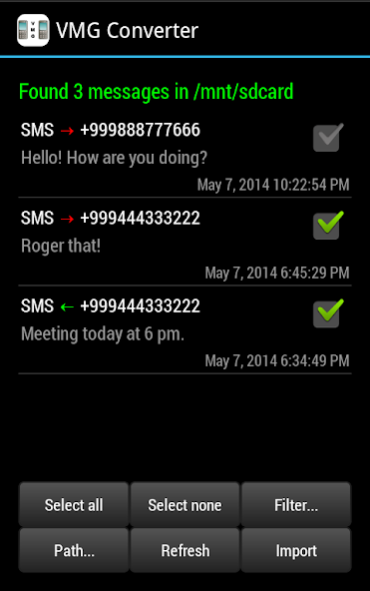
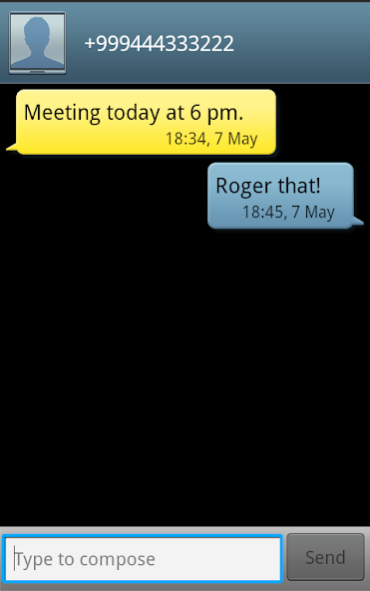

With VMG Converter you can easily view and import plain text SMS and MMS messages exported from Windows Phone, Symbian or Samsung using .VMG / .VMSG / .MSG / .MMS / .PDU files - straight into Android SMS storage.
FREE VERSION - IMPORTS MAX. 200 MESSAGES AT ONCE. Get the Unlocker to remove this limitation and ads. Get the VMG Converter Unlocker here:
http://goo.gl/hyVcfe
*********************************************
NOTE! The MMS import feature does not work in the Google Play version. Google has decided not to allow READ_SMS permission to many applications. VMG Converter was not eligible for an exception, so distribution of the MMS-enabled version must happen outside Google Play store. Please contact us via email (android@animatedoak.com) if you need the MMS import feature.
*********************************************
INSTRUCTIONS
- Both Windows Phone "Contacts+Message Backup" and "Transfer my data" backup files are supported.
- If VMG Converter cannot parse your messages, the message file format is not (yet) supported. Do not panic, just send email to android@animatedoak.com. We greatly appreciate your feedback and WILL do our best to help you out.
- You must accept to change the default messaging app to VMG Converter temporarily. Afterwards, you MUST accept to change it back when asked, otherwise you won't be able to receive and send messages on your phone.
- Messages ARRIVING DURING IMPORT will not make it to inbox. Turn on the AIRPLANE MODE before importing to make sure no SMS arrive during the import process.
How to use:
1. Export SMS messages to with Nokia PC Suite/Contacts+Message Backup/Transfer My Data.
2. Copy message files to your Android phone. Putting all files in a single folder makes importing easier.
3. Disconnect USB cable if connected.
4. Start VMG Converter.
5. Message listing appears shortly. If not, enter the correct location of VMG Files. Use Auto search to find the correct path if not sure.
6. Select the messages you want to import and press "Import".
7. Read instructions and notes that will pop up.
8. Messages now appear in the Android standard messaging section.
TROUBLESHOOTING (also read "Known issues" below)
1. Crashes while reading in message files
Out of memory errors occur with large amount of files/messages. Report these crashes to us, but as a quick remedy you should try to divide your files into smaller subsets.
2. Wrong time zone
If the time is off by hours in the message list, the VMG files may have their time in some other time zone than UTC. Change the time zone in settings to match the time zone in your VMG files and reload the message list.
3. Message thread time and date is the import time and date
Users of Android versions before 6.0/M may encounter this. If the time is set to import date and time in your message inbox after import, turn on "Refresh threads" setting to update conversation thread date, remove previous imported messages and then do the import again.
4. All messages have the same (wrong) date and time
You may be affected by a PC Suite bug that causes message original date to be the export date. VMG Converter can in some cases circumvent this by reading message date from the file name. Turn on the option from settings and refresh the message list.
5. Messages not appearing after import when using Hangouts
VMG Converter DOES NOT WORK with Hangouts. Switch to default Messaging app.
KNOWN ISSUES
- Possible loss of incoming messages while importing: turn on the airplane mode while importing.
- Android below 6.0 does not show MMS vCard content in Messenger. VMG Converter can import those, but they only show up in Android 6.0+.
- MMS group messages currently show only the first recipient. We're working on this.
- Not all MMS content (vCard, video) can be previewed in VMG Converter. Try importing to see content inside the standard messenger app.
About VMG Converter
The company that develops VMG Converter is JM Software Solutions. The latest version released by its developer is 1.20.
To install VMG Converter on your Android device, just click the green Continue To App button above to start the installation process. The app is listed on our website since 2019-03-09 and was downloaded 0 times. We have already checked if the download link is safe, however for your own protection we recommend that you scan the downloaded app with your antivirus. Your antivirus may detect the VMG Converter as malware as malware if the download link to com.aoe.vmgconverter is broken.
How to install VMG Converter on your Android device:
- Click on the Continue To App button on our website. This will redirect you to Google Play.
- Once the VMG Converter is shown in the Google Play listing of your Android device, you can start its download and installation. Tap on the Install button located below the search bar and to the right of the app icon.
- A pop-up window with the permissions required by VMG Converter will be shown. Click on Accept to continue the process.
- VMG Converter will be downloaded onto your device, displaying a progress. Once the download completes, the installation will start and you'll get a notification after the installation is finished.
Program Details
System requirements
Download information
Pricing
Version History
version 1.20-NoMMS
posted on 2019-03-09
This version carries no MMS support - we are very sorry but MMS support had to be removed due to recently introduced Play store restrictions. Please contact us via email at android@animatedoak.com if you need MMS support.
version 1.18
posted on 2016-04-21
Update 1.18,- Add support for MSG-files created by Windows Phone "Contacts+Message Backup"
Disclaimer
External Download
We do not host VMG Converter on our servers. We did not scan it for viruses, adware, spyware or other type of malware. This app is hosted by Galad and passed their terms and conditions to be listed there. We recommend caution when installing it.
The APK Download link for VMG Converter is provided to you by apps112.com without any warranties, representations or guarantees of any kind, so access it at your own risk.
If you have questions regarding this particular app contact the publisher directly. For questions about the functionalities of apps112.com contact us.
